|
| CHIANTI |
| An Atomic Database for Spectroscopic Diagnostics of Astrophysical Plasmas |
| USER GUIDE - Version 5.0 - 4 August 2005 |
| Written by Giulio Del Zanna |
| with contributions from Peter Young and the team members. |
which_line

pop_processes
The changes introduced to speed the calculations were made necessary by the increasingly larger atomic models now available in CHIANTI, that made the running time of the software of the previous version too long.
The software is backward-compatible, i.e. can be used together with previous versions of the database.
This document is mainly intended as a quick reference to some of the main features of CHIANTI.
Please read the CHIANTI USER GUIDE for more details.
CHIANTI is a collaborative project involving researchers based at the Naval Research Laboratory (NRL, Washington DC, USA), Rutherford Appleton Laboratory (RAL, UK), the University College London (UCL, UK), the University of Cambridge (UK), the George Mason Univerity (GMU, USA) and the University of Florence (Italy).
The CHIANTI package consists of a critically evaluated set of atomic data, a number of ancillary data and a suite of Interactive Data Language (IDL) programs.
The CHIANTI package is freely available. We only ask you to acknowledge and reference CHIANTI appropriately. See one of the CHIANTI WWW pages for details, e.g.:
If a detail work on a particular ion is done, it would be appropriate to also refer to the original publication. References can be found at the end of each data file or on the WWW.
To keep updated on CHIANTI developments, please
CHIANTI is currently distributed in two ways.
The main CHIANTI distribution is within SolarSoft, a programming and data analysis environment for the solar physics community. See http://www.lmsal.com/solarsoft/ for details on how to download and install the package.
The database and the software are organised in a self-contained package
$SSW/packages/chianti/
with the following tree structure:
dbase/    (database)
doc/      (documentation, in particular the USER GUIDE)
idl/      (IDL software)
setup/    (supplementary setup files)
The contents of the SolarSoft CHIANTI package are
mirrored daily from a master tree.
Normally, only small fixes to the existing
software can occur rather frequently.
All modifications to the software are logged in the $SSW/packages/chianti/idl/HISTORY file.
Modifications to the database are much less
frequent. They are described in the
$SSW/packages/chianti/dbase/README_CHIANTI file.
We send an e-mail to the CHIANTI user group every time we make a minor release of the database available.
We recommend that you use CHIANTI within the SolarSoft framework and that you setup in your site a mirror in order to have automatic upgrades.
Once the SSW package is installed, to run the CHIANTI routines all you need to do is
 unix> setssw chianti
 unix> sswidl
or to add the CHIANTI package once in SSW:
 unix> sswidl
 sswidl> ssw_packages,/chianti
CHIANTI is also distributed on the WWW, as tar files, via one the CHIANTI WWW pages. The tar files have a similar tree structure as the SolarSoft distribution.
E.g. the data are in CHIANTI_5.0_data.tar that contains a copy of $SSW/packages/chianti/dbase.
CHIANTI_5.0_pro.tar contains doc/, a copy of $SSW/packages/chianti/doc/ and idl/, a copy of $SSW/packages/chianti/idl/, plus idl/gen/, a copy of a subset of the $SSW/gen/ routines. This is because some routines of the $SSW/gen/ directory are needed to run some of the CHIANTI programs.
CHIANTI is a package, in the sense that database and progams are to be used together. The current version of the database should be used with the current version of the programs.
Download the CHIANTI files
Download the CHIANTI data tar file (e.g. CHIANTI_5.0_data.tar.gz) and the CHIANTI IDL procedures tar file (e.g. CHIANTI_5.0_pro.tar.gz) and put the tar files into a directory (for example, /data1/chianti/dbase for the data and /data1/chianti/ for the software) and then do the following:
unix> gunzip [file_name].tar.gz
unix> tar xvf [file_name].tar
This will copy all the CHIANTI data files into /data1/chianti/dbase and create the /data1/chianti/idl and /data1/chianti/doc/ directories.
Define the IDL paths and the system variables
To run any CHIANTI IDL procedure, the following is needed:
There are many ways of doing the above. We suggest the following. Place the following statements in your IDL_STARTUP file:
Unix users (assuming that the IDL procedures are in /data1/chianti/idl and the data files are in /data1/chianti/dbase ):
 !PATH = '+/data1/chianti/idl:'+!PATH
 !PATH = EXPAND_PATH(!PATH)
 use_chianti, '/data1/chianti/dbase'
Windows users (assuming that the IDL procedures are in C:\data1\chianti\idl and the data files are in C:\data1\chianti\dbase ):
!PATH = '+C:\data1\chianti\idl;'+!PATH
!PATH = EXPAND_PATH(!PATH)
use_chianti, 'C:\data1\chianti\dbase'
The '+' and the EXPAND_PATH are needed since the IDL routines are organised into subdirectories.
use_chianti also allows you to set your default abundance and ionization equilibria files with the abund and ioneq keywords.
If you do not have an IDL STARTUP file you can create it (say ~/.idl\_startup), and add in your .login file (Unix):
setenv IDL_STARTUP ~/.idl_startup
(Note that the changes to the .login file mean that you should do a source ~/.login before running IDL).
After following the above steps, it will be possible to run the CHIANTI routines from any directory by simply starting IDL.
Alternatively, instead of using use_chianti, '/data1/chianti/dbase', you have to make sure you have in your IDL STARTUP file something like this:
 !PATH = '+/data1/chianti/idl:'+!PATH
 !PATH = EXPAND_PATH(!PATH)
defsysv,'!xuvtop', '/data1/chianti/dbase'
defsysv,'!ioneq_file', !xuvtop+'/ioneq/mazzotta_etal.ioneq'
defsysv,'!abund_file',!xuvtop+'/abundance/cosmic.abund'
defsysv,'!BCOLOR',0
defsysv,'!ASPECT',1.0
The database has a tree structure, with the top directory designated with the IDL system variable !xuvtop (and named dbase within SolarSoft):
dbase/

In the top directory are the following files:

        README_CHIANTI   with the description of the current version.
        VERSION	         with the version number.

Then, there is a series of subdirectories, one for each element present in the database.
Each element has  a subdirectory  for each ion.
The filename prefix for each ion follows spectroscopic notation.
For example, for He, we have He I and He II subdirectories:

        he/
           he_1/
           he_2/

Then, we have a series of ancillary data that are contained in
various subdirectories:

        masterlist/
                         has the list of the ions currently present
                         in the database
        abundance/       with elemental abundance files.
        continuum/       contains files for the continuum calculations.
        dem/             has DEM files.
        ioneq/           contains ionization fraction files.
        ip/              has ionization potentials.
        ancillary_data/instrument_responses/      with effective areas.
CHIANTI has been run mainly on Sun, Dec Unix workstations and on PCs with Linux. CHIANTI also runs (with some small limitations) under Windows NT and in VMS. Please report to us any problems you might find.
All the IDL routines have been documented with extensive headers giving detailed descriptions and examples. Please read them carefully. For example with:
 IDL > xdoc,'ch_synthetic'
 IDL > doc_library,'ch_synthetic'
The CHIANTI routines are organised in a tree structure. The main level contains some high-level procedures and the HISTORY file, where all modifications to the software are logged.
The high-level routines can be separated in two classes:
| Synthetic spectra | ||
| ch_ss |
| |
| synthetic |
| |
| synthetic_plot |
| |
| isothermal |
| |
| make_chianti_spec |
| |
| Line intensities | ||
| ascii_wvl_dem |
| |
| latex_wvl_dem |
| |
| ch_synthetic |
| |
| ch_line_list |
| |
| Line emissivities | ||
| emiss_calc |
| |
| gofnt |
| |
| g_of_t |
| |
| Density-sensitive line ratios | ||
| dens_plotter |
| |
| density_ratios |
| |
| chianti_ne |
| |
| plot_chianti_ne |
| |
| Temperature-sensitive line ratios | ||
| temp_plotter |
| |
| temperature_ratios |
| |
| chianti_te |
| |
| plot_chianti_te |
| |
| Continuum | ||
| freefree |
| |
| freebound |
| |
| two_photon |
| |
| Level populations | ||
| show_pops |
| |
| plot_populations |
| |
| pop_plot |
| |
| pop_processes |
| |
| Miscellaneous | ||
| rad_loss |
| |
| max_temp |
| |
| plot_ioneq |
| |
| chianti_dem |
| |
| plot_dem |
| |
| integral_calc |
| |
| ch_read_fits |
| |
| ch_write_fits |
| |
For an user-friendly, widget-based approach the best option is to use CH_SS:
IDL >ch_ss
This widget allows the user to calculate synthetic spectra in two basic steps. Basically, you follow the various widgets from top left to lower right to set the desired parameters. First calculate the line intensities. These values can be saved for later use. Next, specify further parameters such as the elemental abundances and instrumental spectral resolution and then calculate and plot the spectrum. These values can also be saved for later use. The HELP buttons in the widget provide short descriptions of the required information. See the USER GUIDE for more details.
Alternatively, for e.g. background jobs, the
routine CH_SYNTHETIC can be used.
ch_synthetic.pro
calculates line intensities assuming
constant pressure or density (or a model Te,Ne),
without the abundance factor.
Example:
  IDL> ch_synthetic, 10,20., output=str , pressure=1.e+15,$
         /photons, /noprot, /all, sngl_ion=['fe_17','fe_18'],$
      ioneq_name=concat_dir(concat_dir(!xuvtop,'ioneq'),'mazzotta_etal.ioneq'),$
         dem_name=concat_dir(concat_dir(!xuvtop,'dem'),'flare.dem'),$
This will calculate the CHIANTI line intensities between 10 and 20 Å for only Fe XVII and Fe XVIII and store them in the IDL structure output. Line intensities are calculated at constant pressure of 1015, have units of photons cm-2 s-1 sr-1 (KEYWORD photons), the proton rates are not included (KEYWORD noprot), and all the lines (KEYWORD all) are included (also the lines with only theoretical energy levels). The program will prompt the user to select an ionization balance and an emission measure file, if these parameters are not supplied via the keywords ioneq_name= , dem_name=.
You can see the contents of the structure with e.g.
IDL> help, str,/st
IDL> help, str.lines[0],/st
The last command shows the first structure associated with the first spectral line.
The CHIANTI line intensities structure can be saved and later restored from the command line in various ways. We suggest two:
IDL> savegen, file='ch_int_10_20_fe.genx', struct=str
IDL> restgen, file='ch_int_10_20_fe.genx', struct=str
to save and restore the IDL structure str in the file ch_int_10_20_fe.genx.
IDL> ch_write_fits, str, 'output.fits'
IDL> ch_read_fits,'output.fits', str
to save and restore the IDL structure str in the FITS file output.fits.
In either case, the structure saved in the .genx and .fits files can be restored via the widget CH_SS to later create a spectrum or tables of line intensities. Alternatively, you can use CH_LINE_LIST to multiply for the abundance factor and output tables of line intensities. For example:
IDL> restgen, file='ch_int_10_20_fe.genx', struct=str
IDL> ch_line_list, str, 'ch_line_list.tex', /latex,$
     abundfile=concat_dir(concat_dir(!xuvtop,'abundance'),'cosmic.abund'),$
     mini=1e13
This creates a latex file ch_line_list.tex where only lines with an intensity greater than 1013 (KEYWORD mini) are included, and the allen.abund file in the standard CHIANTI distribution is used (if not supplied it can be selected with a widget). Then, you have to latex the file three times, and optionally xdvi it:
unix> latex ch_line_list
unix> latex ch_line_list
unix> latex ch_line_list
unix> xdvi ch_line_list
If you do not have it already, you will need the package longtable.sty that is distributed as part of ftp://cam.ctan.org/tex-archive/macros/latex/required/tools.tar.gz
You will obtain a table that looks like:
| Line List * tab:obs | ||||
| Ion | l (Å) | Transition | Tmax | Int |
|
| ||||
| Ion | l (Å) | Transition | Tmax | Int |
| Fe XVII | 12.1227 | 2p6 1S0 - 2p5 4d 1P1 | 6.9 | 1.11e+14 |
| Fe XVII | 12.2639 | 2p6 1S0 - 2p5 4d 3D1 | 6.9 | 9.81e+13 |
| Fe XVII | 13.8231 | 2p6 1S0 - 2s 2p6 3p 1P1 | 6.9 | 6.25e+13 |
| Fe XVIII | 13.9540 | 2s2 2p5 2P3/2 - 2p4 (1S) 3d 2D5/2 | 6.9 | 2.06e+13 |
| Fe XVIII | 14.1519 | 2s2 2p5 2P3/2 - 2p4 (1D) 3d 2D3/2 | 6.9 | 1.35e+13 |
To create an ascii file with the line details you can follow a similar approach, i.e.:
IDL> restgen, file='ch_int_10_20_fe.genx', struct=str
IDL> ch_line_list, str, 'ch_line_list.ascii', /ascii,$
     mini=1e13
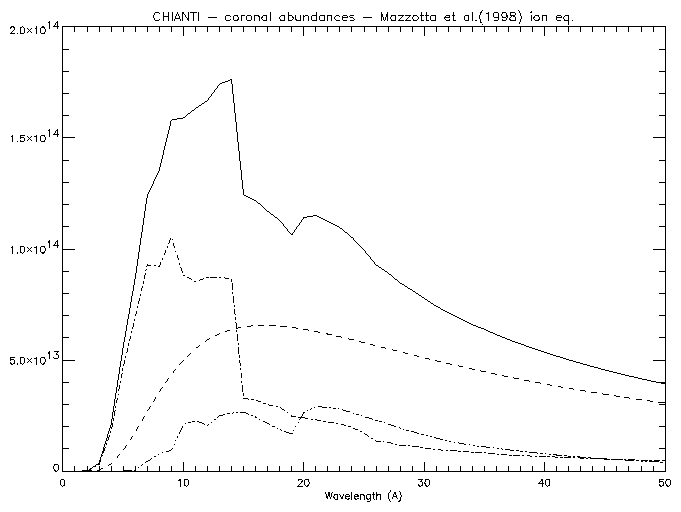
For example, to calculate the free-free, free-bound and two-photon continuum at a temperature of 5 × 10⁶ K, for wavelengths at 1 Å intervals between 1 and 50 Å:
freefree,5.e+6,findgen(50)+1.,ff
freebound,5.e+6,findgen(50)+1.,fb
two_photon,5.e+6,findgen(50)+1.,tp

window,0
plot,findgen(50)+1.,ff+fb+tp,xtit='Wavelength (A)'
oplot, findgen(50)+1.,ff,line=2
oplot, findgen(50)+1.,fb,line=3
oplot, findgen(50)+1.,tp,line=4
|
Note that the intensities are in units of 10-40 ergs cm3 s-1 sr-1 Å-1 per unit emission measure òNH Ne dh (cm-5).
If DEM values are passed to the routines (via the keyword DEM_INT), it is assumed that they are given as NH Ne dh/dT . The units are 10-40 ergs cm-2 s-1 sr-1 Å-1 in this case.
The structure created by CH_SYNTHETIC can be restored via CH_SS to create a spectrum. Alternatively, it can be used as an input to the program MAKE_CHIANTI_SPEC. This program creates the CHIANTI SPECTRUM structure, an OUTPUT structure similar to the structure created by CH_SYNTHETIC, with some additional tags. Following the previous example:
IDL> restgen, file='ch_int_10_20_fe.genx', struct=str
IDL> make_chianti_spec, struct, lambda, struct, /CONTINUUM,$
     BIN_SIZE=0.01, instr_fwhm=0.1,  WRANGE=[10.,19.],$
      abund_name=concat_dir(concat_dir(!xuvtop,'abundance'),'cosmic.abund')
To see the contents of the structure:
IDL> help, struct,/st
IDL> help, struct.lines[0],/st
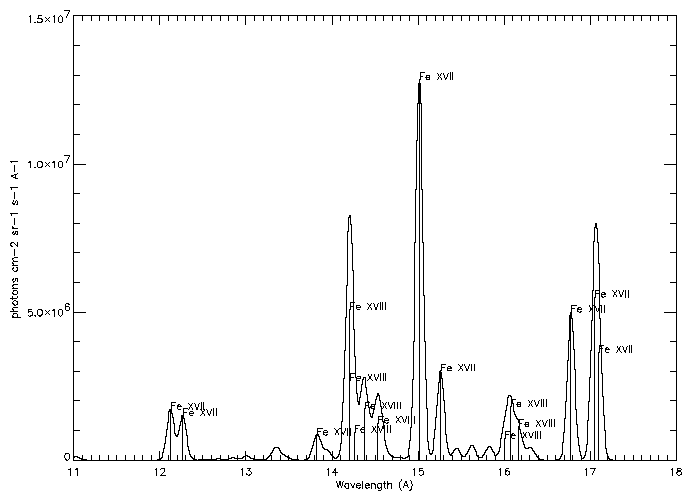
While to show the spectrum and the main contributing lines:
IDL> window,0
IDL> plot,struct.lambda,struct.spectrum,psym=10,xr=[11,18],/xst,$
IDL> xtit='Wavelength (A)',ytit='photons cm-2 sr-1 s-1 A-1'
IDL>    for i=0,n_elements(struct.lines) -1 do begin
IDL>      if struct.lines[i].peak gt 7e5 then begin
IDL>        xyouts, struct.lines[i].wvl,  struct.lines[i].peak, struct.lines[i].snote
IDL>        oplot,[struct.lines[i].wvl,struct.lines[i].wvl],[0,struct.lines[i].peak]
IDL>      end
IDL>    end
|
It may be useful to save the SPECTRUM structure, that can be later inspected with the widget CH_SS:
IDL> savegen, file='ch_spectrum_10_20_fe.genx', struct=struct
IDL> ch_write_fits, struct, 'ch_spectrum_10_20_fe.fits'
DENS_PLOTTER and TEMP_PLOTTER are high-level widgets for the analysis of density- and temperature-sensitive ratios of lines from the same ion. They allow inclusion of proton rates and photoexcitation. The calling sequence is simple:
IDL > dens_plotter,'o_5'
to study O V.
IDL > temp_plotter,'c_4'
to study C IV.
Alternatively, you can use the command-line routines, DENSITY_RATIOS and TEMPERATURE_RATIOS. They also allow inclusion of proton rates and photoexcitation via KEYWORDS.
The DENSITY_RATIOS procedure
The routine DENSITY_RATIOS plots the variation of
line intensities with electron density, allowing density diagnostics
to be studied.
As an example, we can look for density sensitive
line ratios of O V in the 1000 to 1500 Å
wavelength region for densities between
108 and 1013 cm-3:
IDL >density_ratios,'o_5',1000.,1500.,8.,13.,den,rat,desc
two windows will open and plot the relative intensities of a few O V lines. To choose the ratio of 1371.294 to 1218.393 Å line, select first the 1371.294 Å line. Another widget will appear to select the denominator. Select the 1218.393 Å line. This will chose the ratio of 1371.294 to 1218.393 which will be plotted in a new window. Values of the density and intensity ratio will be put into the variables den and rat and desc will contain a descriptive string. By specifying the keywords outfile and psfile, the ratios values and plots will be saved in files.
The DENSITY_RATIOS procedure also allows to calculate the ratio at user-defined value of constant temperature. Blends are accounted for via a selection of lines.
The TEMPERATURE_RATIOS procedure
To calculate temperature sensitive line ratios of C IV for
lines between 100 and 1600 Å for temperatures between
104 and 106 K:
IDL > temperature_ratios,'c_4',100.,1600.,4.,6.,temp,rat,desc
As with density_ratios, a widget will appear that will allow you to select the numerator. Select the 384.175 and 384.190 Å lines as these will typically be blended in most spectrographs. Select the 1550.775 Å line for the denominator. The ratio of (384.175 + 384.190 Å) to the 1550.775 Å line as a function of temperature will be plotted and stored in the variables rat and temp, respectively. The TEMPERATURE_RATIOS procedure also allows to calculate the ratio at user-defined values of either constant pressure or constant density. As with density_ratios, the outfile and psfile keywords specify output files.
To plot the populations of the first 4 levels of Si III as a function of density at a temperature of 3 x 10⁴ K:
IDL > plot_populations,'si_3',3.e+4,4
Optionally, output files can be created.
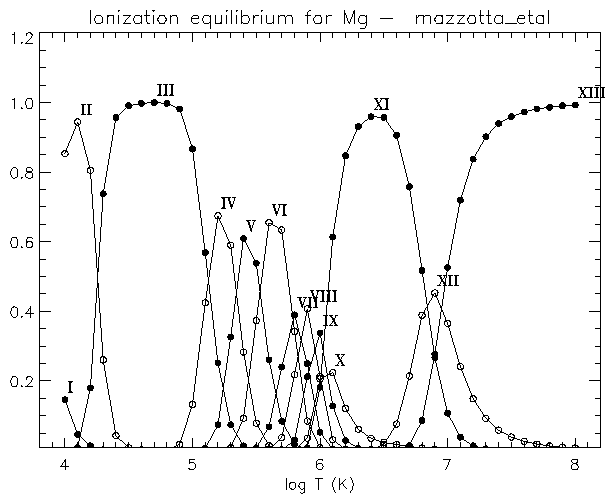
If you are interested to see the differences between the various ionisation equilibria for e.g. Mg, you can use:
IDL > plot_ioneq,'Mg'
You will be able to select one of the files, and optionally create a postscript file of the plot.
|
To calculate the contribution function ( erg cm3 s-1 sr-1 by default) vs. temperature at a specified abundance, ionization equilibrium and pressure or density for the Fe XXIV line at 255.1 Å:
IDL > gofnt,'fe_10',170.,180.,temperature,g,desc
temperature, g are the arrays with the temperatures and the G(T) values. It is possible to calculate the G(T) at either constant electron density or pressure, via the KEYWORDS DENSITY or PRESSURE. The routine GOFNT allows the user to select a number of lines. If this is done, then the total sum of the G(T)'s of the selected lines is returned and plotted.
The KEYWORDS ABUND_NAME, IONEQ_NAME allow to run the routine in the background, giving names of the abundance and ionization fractions files.
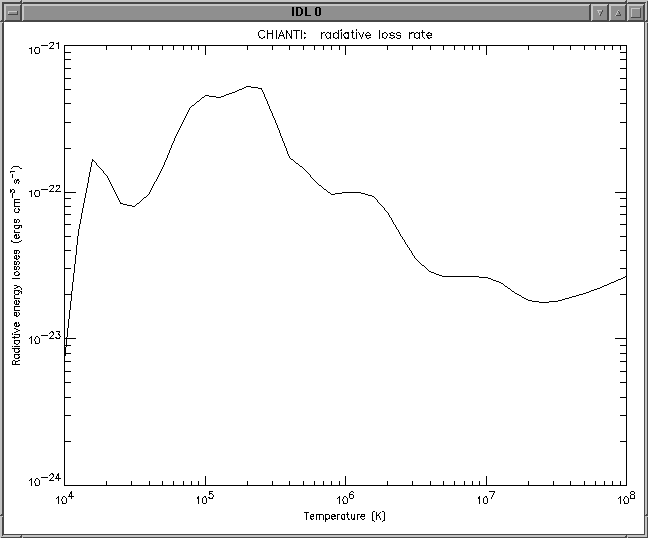
A procedure ('RAD_LOSS') calculates the total radiative loss rate as a function of temperature for specified set of abundances and/or ionization equilibria:
IDL > rad_loss,temperature,loss_rate
|